Guide
By Shubham SinghHow to schedule a WhatsApp message
The ways to send a WhatsApp message later, and how Hyv reminds you at the right time with the message written for you to send.
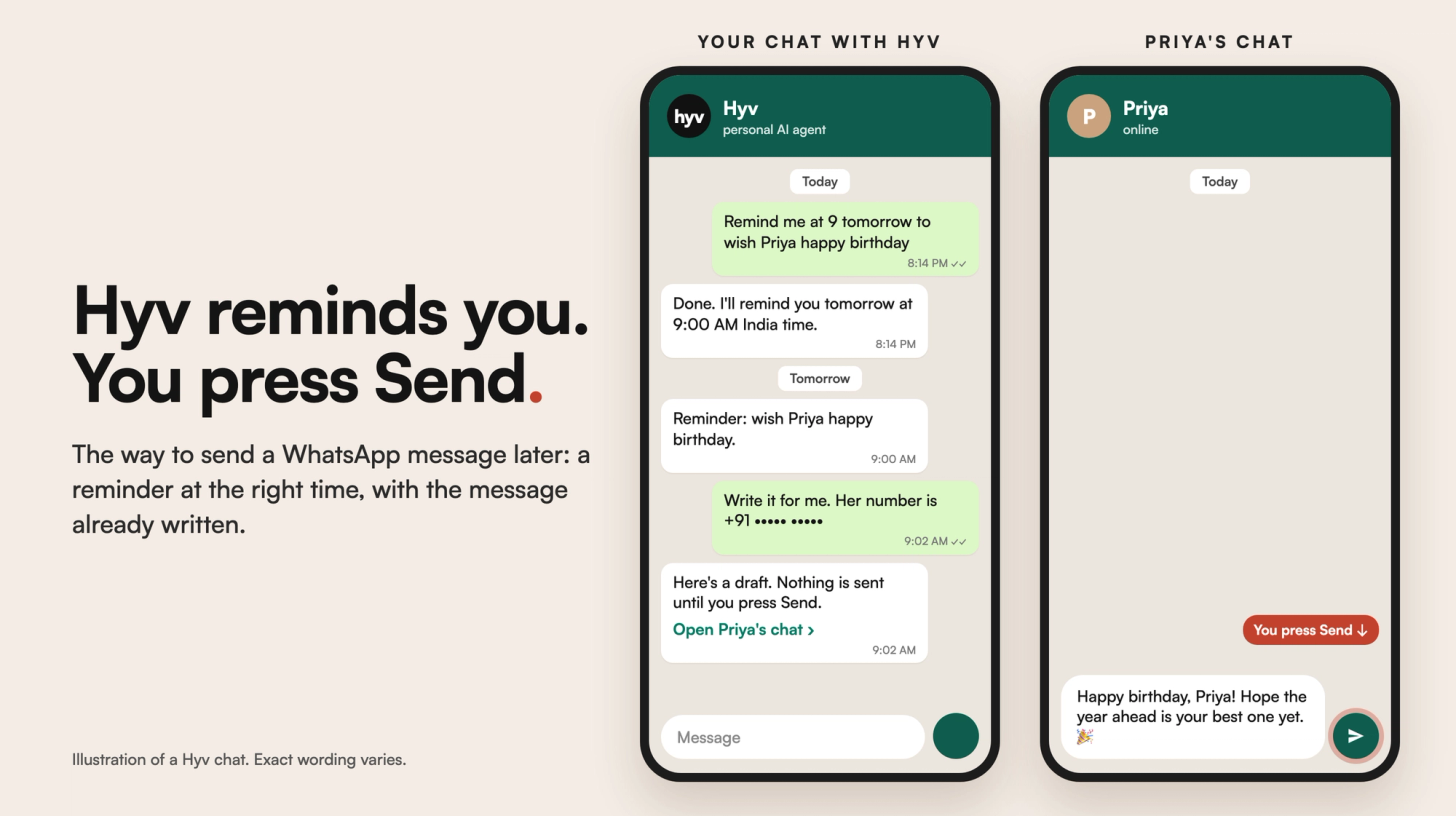
To schedule a WhatsApp message, first check your own app: WhatsApp is testing a built-in way to send messages later with some users. If you don't have it yet, you can use your phone's automation app, or have an assistant remind you at the right time with the message already written. With Hyv, you ask in plain words, Hyv reminds you and drafts the message, and you press Send yourself.
Can you schedule a message in WhatsApp itself?
WhatsApp is testing a built-in option to schedule messages with some users. To see if you have it, update WhatsApp and look for a schedule option when you send a message. Whether you have it depends on your app version, so if you don't see it, use one of the other ways below.
What are the ways to send a WhatsApp message later?
- WhatsApp's own schedule option. Still being tested. If your app has it, it is the simplest way.
- WhatsApp Business tools. The Business app has automatic greeting and away messages for customers. They reply to people who write to you; they don't send a message you chose at a time you chose.
- Your phone's automation app. Some phones can run an automation at a set time that opens WhatsApp with your message ready. On most phones you still unlock the phone and tap Send.
- Unofficial scheduling apps. Some apps ask for access to your phone or your WhatsApp account so they can send for you. WhatsApp's terms don't allow unofficial apps that automate accounts, and accounts that use them can be banned. Think twice before giving any app that access.
- A reminder with the message ready. An assistant in your chat reminds you at the time and writes the message, and you send it. Nothing goes out without you.
How do you do it with Hyv?
- Open your private chat with Hyv on WhatsApp or Telegram.
- Ask for a reminder at the time you want to send: "remind me at 9 tomorrow morning to wish Priya happy birthday". Hyv confirms the date, time and timezone it saved, so you can correct it straight away.
- When the reminder arrives, ask Hyv to write the message and give the person's number with the country code.
- Hyv sends you the draft and a link that opens that person's WhatsApp chat with the message already typed in. Change it if you like, then press Send.
Hyv never sends the message for you. That is on purpose: a message from you should leave when you decide. More on each step in How to set reminders on WhatsApp and AI message drafts on WhatsApp: you press Send.
Questions
Does WhatsApp have a schedule message feature?
WhatsApp is testing one with some users. Update the app and look for it when you send a message. If you don't see it, a reminder with a ready draft does the same job, and you stay the one who presses Send.
Can Hyv send the message for me at the scheduled time?
No. Hyv reminds you and writes the draft, and you press Send. Hyv does not write into other people's chats on your behalf.
Can I schedule a message to a WhatsApp group?
Hyv's reminders and draft links work in your private chat with Hyv, and a draft link opens a chat with one number. For a group, ask Hyv to remind you at the time, then send the message in the group yourself.
Is it safe to use apps that schedule WhatsApp messages for you?
Be careful. Apps that need access to your WhatsApp account or control of your phone can read your chats, and WhatsApp can ban accounts that use unofficial apps. A reminder with a draft needs no access to your account.
How do I get Hyv?
Hyv is invite-only for now. You can join the waitlist at hyv.me.
Hyv is invite-only for now.
Ask for an invite and we will set you up.
More from Insights · Add Hyv as a preferred source on Google